
Print order management software for distributors, brokers and forms resellers
Intelliform Pro is cloud-based print order management software for distributors and brokers who buy print from trade printers. It keeps every job on one record: the RFQs to your vendors, the quote to your customer, the purchase order to the printer, the invoice, the payment and the QuickBooks entry.
It’s built for small independent distributorships, from a two-person office to a team of fifty, that sell commercial print, business forms, labels and envelopes without running a press. One plan, every feature, month to month. Try it free for 7 days.
Card required. Cancel any time.
Built for print distributors, not print shops
A print MIS is built for a shop that runs presses: it schedules equipment, estimates press time and tracks work on the floor. A distributor’s work is different. You get prices from vendors, mark them up, send the job to the printer that fits it and manage it until it’s invoiced. Intelliform Pro is print distributor software for that second model.
If you’re not sure which one your business needs, read print MIS vs distributor order software.
Print broker management software, from vendor quote to invoice
Every job moves through the same record, so nothing gets retyped.
1. Ask your printers for pricing
Pick the vendors, enter up to three quantities and generate one RFQ per vendor. Each vendor gets its own email with only its own RFQ, and the order's artwork can attach automatically. Turn on “Hide customer info on RFQs” and your customer's name, contact, ship-to and phone stay off the vendor's copy.
2. Record what comes back
Each vendor's quote sits on the order's Quotes tab: quote number, up to three quantity and cost pairs, setup, artwork, rush, freight and lead time, side by side.
3. Quote your customer
Price up to three quantity breaks. The status moves from RFQ to Quote to Order as the job goes forward. If you turn on Customer approvals (beta), your customer can approve the quote from an emailed link.
4. Send the purchase order
Print or email a PO to the printer with the full specs. A selling price never goes into a vendor's email.
5. Confirm and keep the job jacket
Send your customer an acknowledgement. Print a File Copy for the job folder with your cost, price and margin on every line.
6. Ship in pieces when the job does
Split shipments list every destination on the vendor's PO and RFQ, so the printer knows where each box goes.
7. Invoice and get paid
Invoice from the order, record payments and keep the customer's balance current.
More detail on RFQs: print broker software, and in the help center: how quotes and RFQs work.
Business forms distributor software that remembers every spec
Business forms are repeat work with a lot of detail. Intelliform Pro was built around forms from the start, so the specs have real fields instead of a notes box.
Product types that match what you sell
Start an order as Unit Sets, Continuous, Cut Sheets, Labels, Envelopes, Business Cards, Commercial Printing, Ad Specialties or Multi Item, or set up your own product types based on them. Each type opens its own spec layout. Unit Sets and Continuous forms get a parts grid with size, weight, grade, color and inks for each part, plus carbon, numbering, starting number, number per unit, punching, perfs and packaging. Cut Sheets and Labels have their own numbering fields too.
Exact repeats with numbering that picks up where it left off
Duplicate an earlier order, or pick it in Prev Ref # on a new one, and the specs, parts, vendor, cost and price come along. The job type is set to Exact Repeat, and you change only what’s different.
On numbered forms, turn on “Continue numbering on reorders” and Intelliform Pro fills in the next starting number from the last order’s starting number and quantity. No more digging through the old job jacket to find where the last run ended.
Moving from another system? Type the old order number in Prev Ref # and keep it on the new order, even if that order was never in Intelliform Pro.
Templates for the items you sell again and again
Save any order as a template under your own stock number or code. A new order from that template starts with the description, vendor, specs, parts, quantities, costs and prices already filled in.
Know when a customer is due
Set a follow-up date on any order and run the Recall Report to see which customers are coming due this month or next. With Reminders (beta) on, you also get “Time to reorder” suggestions and a morning email with the day’s follow-ups.
More on repeat orders.
Jobs that go to more than one printer
Some jobs don’t fit one vendor: forms from one printer and envelopes from another, or a job that ships to a mail house first.
Partials
Add a Partial to the main order for each extra vendor. Each Partial carries that vendor’s cost, prints its own PO or RFQ, and can ship to another vendor. Your customer is quoted and invoiced once, from the main order, and the order summary can add the Partials’ cost into the job’s cost, profit and margin.
Multi-vendor orders (beta)
On a Multi Item order, each line can have its own vendor, and Intelliform Pro makes one PO per vendor. You can also put setup, artwork and rush charges as their own lines under each item.
Print job tracking software that shows status and margin
One list for every job
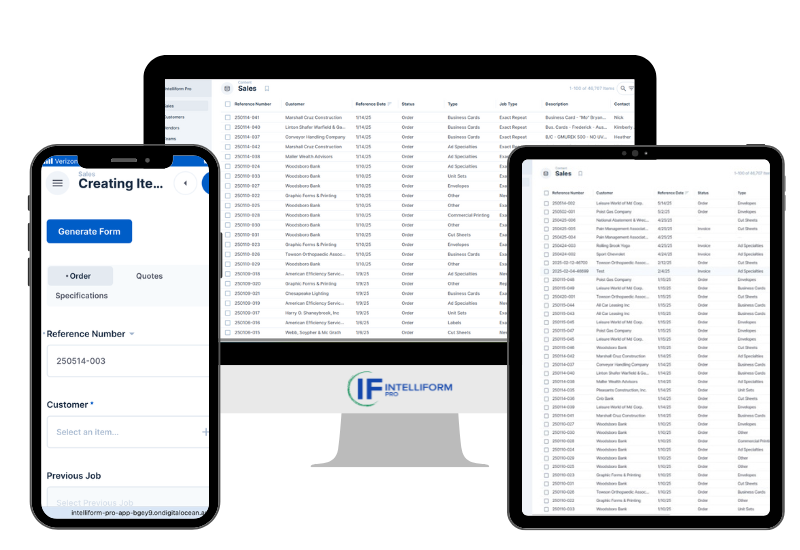
Filter the Sales list by RFQ, Quote, Order, Invoice or Partial, and search by reference number, customer or description.
A record of what was sent
Every order keeps a log of the emails sent from it: when, to whom and the subject.
Reports
Sales, Recall, Invoice, Open Transactions, Customer Aging and Commissions reports, plus customer statements. Save the reports you run every month and share them with the team, or keep them to yourself.
Commissions
Pay reps on net profit or gross, and keep commission rates visible only to owners and admins if you prefer.
QuickBooks Online or QuickBooks Desktop
Intelliform Pro works with both. The QuickBooks Online connection is approved by Intuit for production use and syncs customers, items, invoices and payments in the direction you choose. For QuickBooks Desktop Pro, Premier and Enterprise, Intelliform Pro writes an import file with customers, invoices, memos, vendor bills and payments.
The details, including what each version sends, are on our QuickBooks order management page.
Your name on every document
Your logo everywhere
Your logo on quotes, POs, acknowledgements, invoices and reports.
Invoice layouts
Window-envelope and tri-fold invoice layouts, printing on your letterhead, or printing the invoice data onto your own preprinted invoice forms.
Your own mailbox
Email from your own Google Workspace or Microsoft 365 mailbox, or another provider, with a copy in your Sent folder.
Also sell promotional products?
The same system runs promo jobs just as fully. Search SAGE products and add them to an order (beta, with your own SAGE account), send separate POs to the supplier and the decorator, and keep artwork with the job. Plenty of distributors sell print, forms and promo to the same customers, and they all live in one customer record.
Pricing for small distributors
Intelliform Pro is one plan with every feature. Each extra user is $15 a month. It’s month to month, and you can cancel any time. Some comparable per-user tools run $260 or more a month for a small team; with Intelliform Pro, a growing office adds people for $15 each.
Start with a 7-day free trial (card required). No sales call needed.
Is Intelliform Pro the right print distributor software for you?
It’s a good fit if you:
- Buy print, forms, labels or envelopes from trade printers and resell them.
- Want RFQs, quotes, POs, reorders and invoices on one record.
- Sell repeat business forms with parts and numbering.
- Keep your books in QuickBooks Online or QuickBooks Desktop.
Look at a print MIS instead if you run your own presses and need press scheduling, production estimating or shop-floor tracking. Intelliform Pro manages the jobs you buy from vendors; it doesn’t schedule equipment.
Switching from another system
Create your company account and we’ll help you bring your customers, vendors and open work across. There’s no automatic importer; we work through it with you. Because the plan is month to month, you can run both systems for a billing cycle before you decide.
Intelliform Pro runs in your web browser with nothing to download. You can install it as an app from Chrome or Edge, or use it on your phone.
Already on the older desktop version of Intelliform? Upload your backup (link in the site footer) and we’ll bring in your customers, vendors and order history.
Frequently asked questions
What is print order management software?
It’s software that runs a print distributor’s or broker’s jobs in one place: vendor RFQs, customer quotes, purchase orders to printers, invoices, payments and customer records.
What's the difference between print order management software and a print MIS?
A print MIS runs a shop with presses: scheduling, press estimating and production tracking. Print order management software runs jobs you buy from vendors: RFQs, quotes, POs, reorders and invoicing.
Can I get quotes from several printers at once?
Yes. Pick the vendors and up to three quantities, and Intelliform Pro makes one RFQ per vendor. Each vendor can get its own email with only its own RFQ.
Can I keep my customer's name off what vendors see?
Yes. With “Hide customer info on RFQs” turned on, the customer’s name, contact, ship-to, PO number, email and phone are left off RFQs.
How do reorders work for business forms?
Duplicate the earlier order or pick it in Prev Ref #, and the specs, parts, vendor, cost and price carry over. With “Continue numbering on reorders” on, the next starting number is filled in for you.
Can one job go to more than one vendor?
Yes. Add a Partial for each extra vendor; each one prints its own PO, and your customer gets one invoice from the main order.
Does it work with QuickBooks?
Yes. QuickBooks Online connects directly through an Intuit-approved connection, and QuickBooks Desktop Pro, Premier and Enterprise use an import file.
Do I have to sell promotional products too?
No. Intelliform Pro works for print-only and forms-only distributors. If you do sell promo, it’s fully supported, including SAGE product search (beta).
Is there a free trial, and is there a contract?
There’s a 7-day free trial (card required). After that the plan is month to month, and you can cancel any time.
Can you help me move from my current system?
Yes. We help you move your customers, vendors and open work. There’s no automatic importer; we do it with you.